
Radiant Live Signals deliver every entry, scale-in, partial close, full close and reversal from our AI trading desk straight to your Telegram. This guide walks through the subscribe page in the screenshot below and explains exactly what each filter does — so you only receive the signals you actually want to act on.
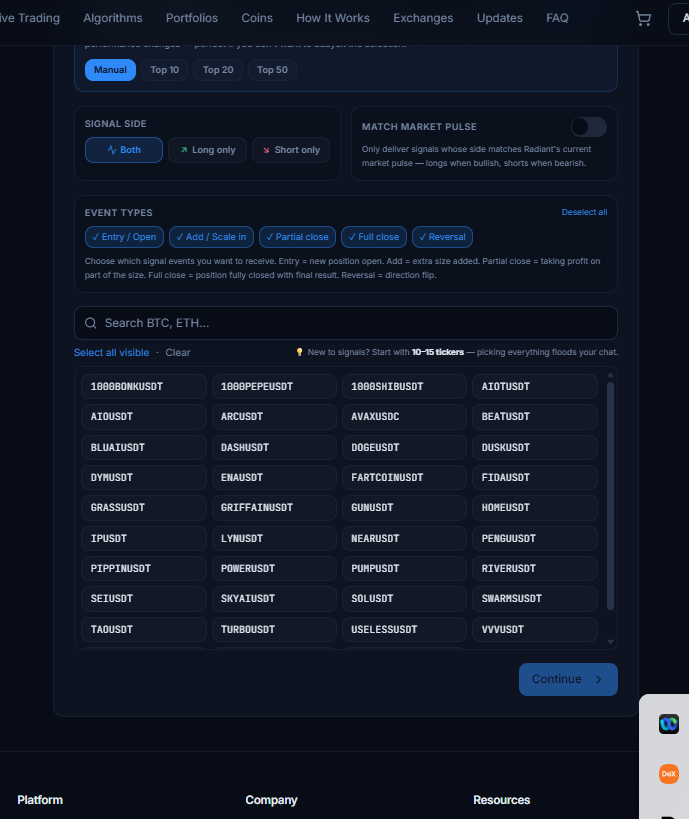
## 1. Pick your ticker universe
The top row decides which symbols are eligible at all:
- **Manual** — you choose the exact tickers from the grid below.
- **Top 10 / Top 20 / Top 50** — Radiant auto-selects the best-performing symbols from the last 30 days of closed trades. The list refreshes daily, so you always follow what's currently working.
New to signals? Start in **Manual** mode with **10–15 tickers** you actually care about. Picking everything floods your chat and makes it harder to react.
## 2. Choose the signal side
- **Both** — long and short signals (default).
- **Long only** — only buy-side entries and the events that follow them.
- **Short only** — only sell-side entries and their follow-ups.
If you can't open shorts on your exchange (spot account, no margin), pick **Long only** to avoid noise.
## 3. Match Market Pulse (optional)
Turn this on and you'll only get signals whose direction agrees with Radiant's current market pulse:
- Longs only when the pulse is **bullish**
- Shorts only when the pulse is **bearish**
This filter is the easiest way to cut signal volume roughly in half while keeping the highest-confluence trades.
## 4. Event types — the new filter
This is where you tell Radiant which events to push:
| Event | When it fires | Why you might want it |
|---|---|---|
| **Entry / Open** | A new position opens | Required if you plan to mirror trades |
| **Add / Scale-in** | Extra size is added to an open position | Tells you the AI is increasing conviction |
| **Partial close** | The AI takes profit on part of the size | Useful for risk management |
| **Full close** | The position is fully closed with final ROI | Required if you mirror trades — this is your exit |
| **Reversal** | Position flips direction (e.g. long → short) | Strong signal that the regime changed |
All five are on by default. Turn off anything you don't want — for example, leave only **Entry** and **Full close** if you just want simple "open / close" alerts and don't care about intermediate adds or partials.
> You must keep at least one event type selected — the page will block you from continuing otherwise.
## 5. Select tickers
Use the search box to find a symbol quickly (typing `BTC` filters the list), then click each tile to add it to your subscription. The **Select all visible** and **Clear** shortcuts at the top help when you change the search filter.
A few tips:
- Each green tile = a ticker you'll receive signals for.
- The order in the grid is alphabetical, not by performance.
- Switching from **Manual** to **Top 20** replaces your selection with the current top performers.
## 6. Continue, link Telegram, and you're done
Hit **Continue** to move to **Step 2** where you paste your Telegram link or `@username`, then **Step 3** to review and confirm.
- Free trial: 14 days, up to 3 tickers, no payment required.
- Paid plan: $15/month, multi-month discounts on Step 3.
That's it — once you confirm, signals start landing in your Telegram on the very next trade Radiant publishes.
## Changing filters later
Come back to this page any time. Your existing selection is pre-loaded, and the **Manage your signals subscription** banner at the top lets you edit tickers, change event types, switch sides, or extend your plan with a discount.